The current version is 7.4.1 and is available in prebuilt binaries for MacOS, Windows and Linux operating systems. Please update regularly in order to get the latest bug fixes.
Free Trial Instructions
- Download the precompiled binary for your operating system
- Launch DREAM3D-NX
- Follow the in-app instructions to get your free trial license code
- MacOS Intel DREAM3DNX-7.4.1-macos-x86_64.dmg
- MacOS Apple Silicon DREAM3DNX-7.4.1-macos-arm64.dmg
- Microsoft Windows 10/11 DREAM3DNX-7.4.1-windows-AMD64.zip
- Linux DREAM3DNX-7.4.1-linux-x86_64.tar.gz
View and search the DREAM3D-NX documentation
| SHA 512 Hash | Archive |
|---|---|
| 53ed59aa67d116801f776cd9393dc4fb7f9eba5bcb1723ff2e72c954b7789069bfddcf747fb6e8c6f38658e9329bc07707aac24a860b836fd97795df0c18fbf5 | DREAM3DNX-7.4.1-linux-x86_64.tar.gz |
| a1cb42ccb1060acf3e10c4a4e3d33b5f2483cc641fda6aa82870025b940653b147a6d520f90ccbb09eefec7ba2b6f968678240a9211c295c725d0fec6b560966 | DREAM3DNX-7.4.1-macos-arm64.dmg |
| 141f6fa28e1532c904d50de310498d7b0020ee79ee959e4f21dfc3bebdcfee3273be692ea2967d03398f9836db41cfd8e848f584321bf97011b78f0c091b133f | DREAM3DNX-7.4.1-macos-x86_64.dmg |
| e03b3571705a9a39fb15e0d74b4c87a65f21469df68717e8c0e6049459c1bd6b727224b62398e6bfa05fa2e7082f2c9097b5d0024a12053efb3f5101a0af140d | DREAM3DNX-7.4.1-windows-AMD64.zip |
MacOS Specific Instructions
 .
.
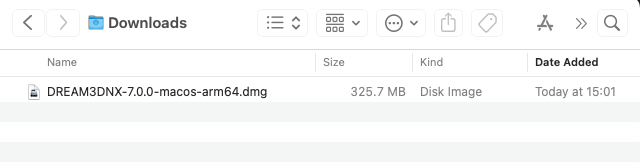
Please select the appropriate download for your architecture and download that file. Look in your "Downloads" folder for the ".dmg" file and double click on the file to mount the disk image. A Finder window will then open and now you can drag the DREAM3DNX.app into the Applications folder.
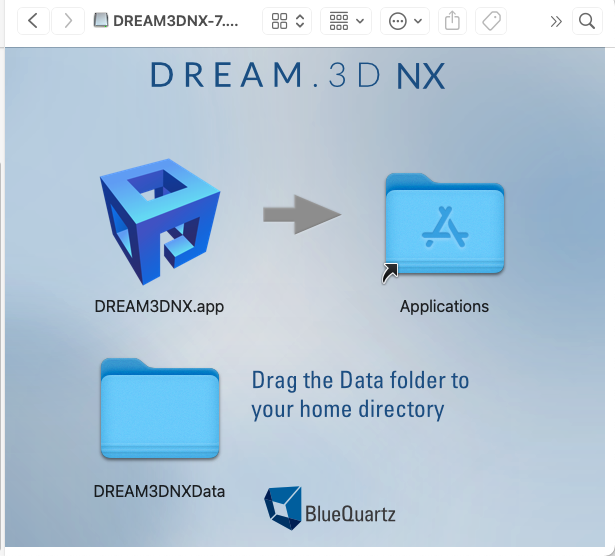
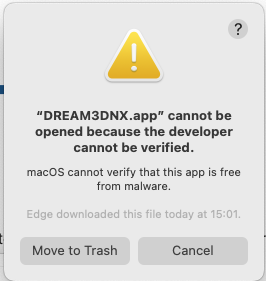
Once the copy has completed, navigate to the Applications folder and double click on the DREAM3DNX.app application. You will be presented with a warning dialog box:
 .
.
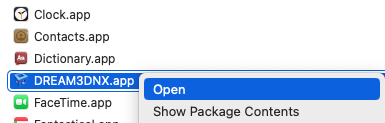
Click the "Cancel" button. Now "Right Click" on the application and select open:
 .
.
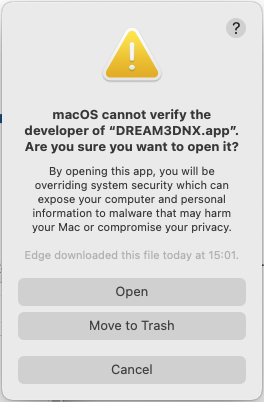
This will present another dialog box:
 .
.
This time click on the Open button. DREAM3D-NX will now open. You only have to do this a single time.