11.3. ITK Adaptive Histogram Equalization Image Filter
Enhances local contrast using a tunable power-law adaptive histogram equalization.
Group (Subgroup)
ITKImageStatistics (ImageStatistics)
Description
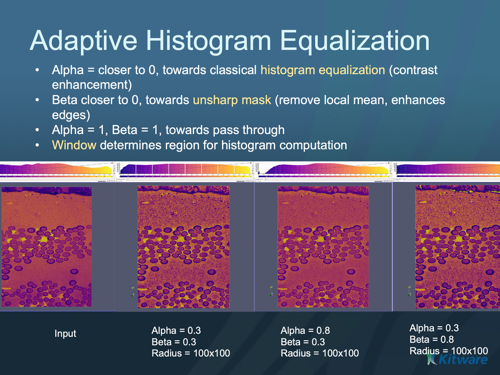
Histogram equalization redistributes pixel intensities to improve contrast. This filter is adaptive: instead of one global remap, it computes statistics in a local window around each pixel and applies a power-law mapping controlled by alpha, beta, and the window size. By tuning those parameters it can behave like classical histogram equalization, like an unsharp mask (local mean subtraction), or anything in between.
Parameter Guidance
Alpha — blends between classical histogram equalization (alpha = 0) and an unsharp mask (alpha = 1). Dimensionless, range 0-1.
Beta — blends between an unsharp mask (beta = 0) and pass-through / no change (beta = 1, with alpha = 1). Dimensionless, range 0-1.
Radius — the half-width of the local window per axis, in pixels; the window spans
2 × Radius + 1pixels along each axis (default radius 5). Larger windows use broader local statistics.
Required Input Sources
Operates on any scalar image — typically from Read Image, Read Images [3D Stack], or the output of a prior ITK image filter.
Reference
J. Alex Stark, “Adaptive Image Contrast Enhancement using Generalizations of Histogram Equalization,” IEEE Transactions on Image Processing, May 2000.
Input Parameter(s)
Parameter Name |
Parameter Type |
Parameter Notes |
Description |
|---|---|---|---|
Radius |
Vector of UInt32 Values |
Order=X,Y,Z |
Radius Dimensions XYZ |
Alpha |
Scalar Value |
Float32 |
Set/Get the value of alpha. Alpha = 0 produces the adaptive histogram equalization (provided beta=0). Alpha = 1 produces an unsharp mask. Default is 0.3. |
Beta |
Scalar Value |
Float32 |
Set/Get the value of beta. If beta = 1 (and alpha = 1), then the output image matches the input image. As beta approaches 0, the filter behaves as an unsharp mask. Default is 0.3. |
Input Cell Data
Parameter Name |
Parameter Type |
Parameter Notes |
Description |
|---|---|---|---|
Image Geometry |
Geometry Selection |
Image |
Select the Image Geometry Group from the DataStructure. |
Input Cell Data |
Array Selection |
Allowed Types: int8, uint8, int16, uint16, int32, uint32, int64, uint64, float32, float64 |
The image data that will be processed by this filter. |
Output Cell Data
Parameter Name |
Parameter Type |
Parameter Notes |
Description |
|---|---|---|---|
Output Cell Data |
DataObjectName |
The result of the processing will be stored in this Data Array inside the same group as the input data. |
Example Pipelines
License & Copyright
Please see the description file distributed with this Plugin
DREAM3D-NX Help
If you need help, need to file a bug report or want to request a new feature, please head over to the DREAM3DNX-Issues GitHub site where the community of DREAM3D-NX users can help answer your questions.