11.59. ITK Not Image Filter
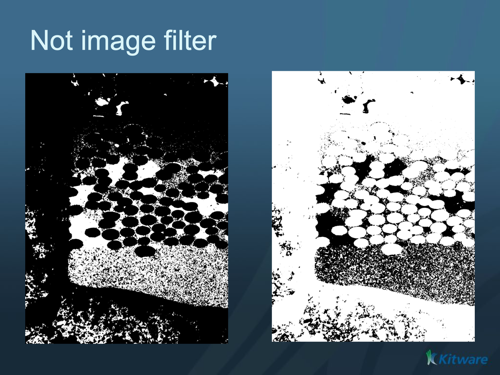
Implements the NOT logical operator pixel-wise on an image.
Group (Subgroup)
ITKImageIntensity (ImageIntensity)
Description
Applies the logical NOT operator to each pixel of an integer image. The input must be an integer-valued image. For each pixel, a value equal to 0 is replaced with the Foreground Value, and any non-zero value is replaced with the Background Value. This is commonly used to invert a binary (mask) image.
Input Cell Data
Parameter Name |
Parameter Type |
Parameter Notes |
Description |
|---|---|---|---|
Image Geometry |
Geometry Selection |
Image |
Select the Image Geometry Group from the DataStructure. |
Input Cell Data |
Array Selection |
Allowed Types: int8, uint8, int16, uint16, int32, uint32, int64, uint64 |
The image data that will be processed by this filter. |
Output Cell Data
Parameter Name |
Parameter Type |
Parameter Notes |
Description |
|---|---|---|---|
Output Cell Data |
DataObjectName |
The result of the processing will be stored in this Data Array inside the same group as the input data. |
Example Pipelines
License & Copyright
Please see the description file distributed with this plugin.
DREAM3D-NX Help
If you need help, need to file a bug report or want to request a new feature, please head over to the DREAM3DNX-Issues GitHub site where the community of DREAM3D-NX users can help answer your questions.