11.41. ITK Intensity Windowing Image Filter
Linearly stretches a chosen input intensity window into a target output range, clamping everything outside the window.
Group (Subgroup)
ITKImageIntensity (ImageIntensity)
Description
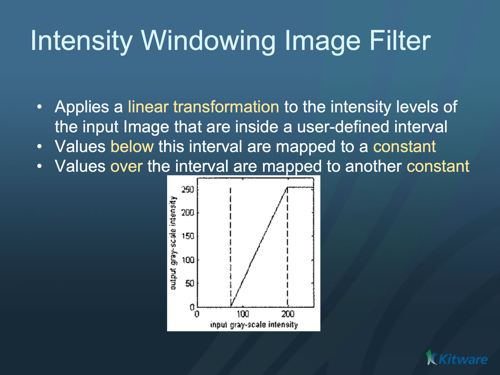
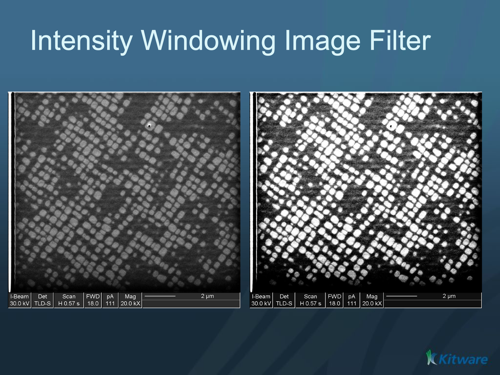
This filter remaps pixel intensities with a linear “window/level” transform, the operation behind most medical-image and CT contrast controls. Input values inside the window — between Window Minimum and Window Maximum — are stretched linearly to fill the output range Output Minimum to Output Maximum. Input values below the window are clamped to Output Minimum, and values above it are clamped to Output Maximum. It is commonly used for visualization and as a preprocessing step before segmentation.
To map the full input range automatically instead of a chosen window, use ITK Rescale Intensity Image Filter.
Parameter Guidance
Window Minimum / Window Maximum — the lower and upper bounds of the input intensity window of interest, in input intensity units. This window is what gets stretched.
Output Minimum / Output Maximum — the target output range, in output intensity units (defaults 0 and 255).
Required Input Sources
Operates on any scalar image — typically from Read Image, Read Images [3D Stack], or the output of a prior ITK image filter.
Input Parameter(s)
Parameter Name |
Parameter Type |
Parameter Notes |
Description |
|---|---|---|---|
Window Minimum |
Scalar Value |
Float64 |
Set/Get the values of the maximum and minimum intensities of the input intensity window. |
Window Maximum |
Scalar Value |
Float64 |
Set/Get the values of the maximum and minimum intensities of the input intensity window. |
Output Minimum |
Scalar Value |
Float64 |
Set/Get the values of the maximum and minimum intensities of the output image. |
Output Maximum |
Scalar Value |
Float64 |
Set/Get the values of the maximum and minimum intensities of the output image. |
Input Cell Data
Parameter Name |
Parameter Type |
Parameter Notes |
Description |
|---|---|---|---|
Image Geometry |
Geometry Selection |
Image |
Select the Image Geometry Group from the DataStructure. |
Input Cell Data |
Array Selection |
Allowed Types: int8, uint8, int16, uint16, int32, uint32, int64, uint64, float32, float64 |
The image data that will be processed by this filter. |
Output Cell Data
Parameter Name |
Parameter Type |
Parameter Notes |
Description |
|---|---|---|---|
Output Cell Data |
DataObjectName |
The result of the processing will be stored in this Data Array inside the same group as the input data. |
Example Pipelines
License & Copyright
Please see the description file distributed with this Plugin
DREAM3D-NX Help
If you need help, need to file a bug report or want to request a new feature, please head over to the DREAM3DNX-Issues GitHub site where the community of DREAM3D-NX users can help answer your questions.