11.16. ITK Black Top Hat Image Filter
Extracts small dark features by subtracting the original image from its grayscale closing.
Group (Subgroup)
ITKMathematicalMorphology (MathematicalMorphology)
Description
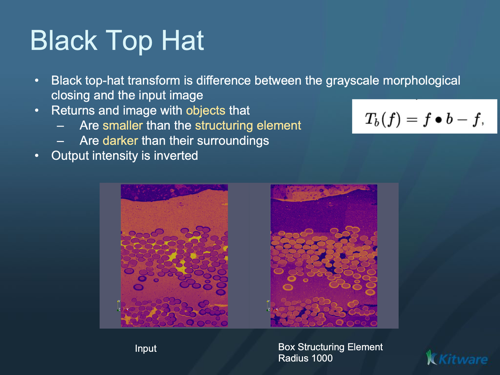
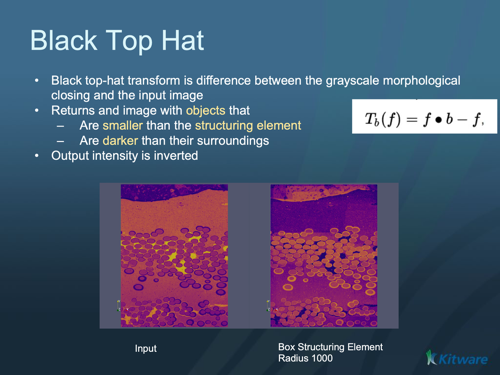
The black top-hat isolates small dark features — dark spots and narrow dark valleys smaller than the structuring element (the probe shape swept over the image). It is computed as the grayscale closing of the image minus the original image, which turns the dark valleys into bright peaks on a flat (near-zero) background. A common use is correcting uneven dark background or extracting small dark details for measurement. The bright-feature counterpart is ITK White Top Hat Image Filter.
Parameter Guidance
Kernel Radius — the radius of the structuring element, in pixels (one value per axis). It sets the size scale: features smaller than the structuring element are extracted, larger structures are removed.
Safe Border — when on (default), a temporary border is added during processing to avoid edge artifacts and removed afterward.
Kernel Type
The Kernel Type parameter selects the structuring element shape:
Annulus [0]: A ring-shaped structuring element.
Ball [1]: A spherical structuring element (default). Most commonly used for general morphological operations.
Box [2]: A rectangular/cuboid structuring element.
Cross [3]: A cross-shaped structuring element.
Required Input Sources
Operates on any scalar (grayscale) image — typically from Read Image, Read Images [3D Stack], or the output of a prior ITK image filter.
Reference
Pierre Soille, Morphological Image Analysis: Principles and Applications, Second Edition, Springer, 2003 (Chapter 4.5).
Input Parameter(s)
Parameter Name |
Parameter Type |
Parameter Notes |
Description |
|---|---|---|---|
Kernel Radius |
Vector of UInt32 Values |
Order=X,Y,Z |
The radius of the kernel structuring element. |
Kernel Type |
Choices |
Set the kernel or structuring element used for the morphology. |
|
Safe Border |
Bool |
A safe border is added to input image to avoid borders effects and remove it once the closing is done |
Input Cell Data
Parameter Name |
Parameter Type |
Parameter Notes |
Description |
|---|---|---|---|
Image Geometry |
Geometry Selection |
Image |
Select the Image Geometry Group from the DataStructure. |
Input Cell Data |
Array Selection |
Allowed Types: int8, uint8, int16, uint16, int32, uint32, int64, uint64, float32, float64 |
The image data that will be processed by this filter. |
Output Cell Data
Parameter Name |
Parameter Type |
Parameter Notes |
Description |
|---|---|---|---|
Output Cell Data |
DataObjectName |
The result of the processing will be stored in this Data Array inside the same group as the input data. |
Example Pipelines
License & Copyright
Please see the description file distributed with this Plugin
DREAM3D-NX Help
If you need help, need to file a bug report or want to request a new feature, please head over to the DREAM3DNX-Issues GitHub site where the community of DREAM3D-NX users can help answer your questions.