11.24. ITK Discrete Gaussian Image Filter
Blurs an image with a Gaussian kernel — the standard linear smoothing/denoising operation.
Group (Subgroup)
ITKSmoothing (Smoothing)
Description
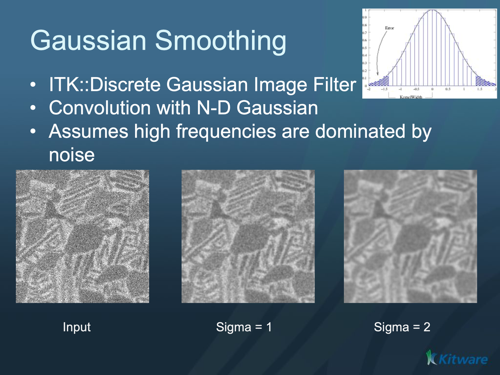
This filter applies Gaussian blurring: each pixel is replaced by a weighted average of its neighborhood, with the weights following a bell-shaped (Gaussian) curve so nearby pixels count more than distant ones. It is the most common general-purpose smoothing/denoising filter. The blur is performed efficiently as a separable convolution and can be set independently per axis.
A faster alternative for large blur widths is a recursive-Gaussian (IIR) smoother, whose run time does not grow with the blur size.
Parameter Guidance
Variance — the blur strength per axis. Note this is the variance (sigma squared), not sigma itself — a common point of confusion. Larger values blur more. Units are pixels² when Use Image Spacing is off, or physical units² when it is on. Typical values are around 1.0-4.0 px².
Use Image Spacing — when on (default), the variance is interpreted in the geometry’s physical units; when off, in pixels.
Maximum Kernel Width — the largest kernel size, in pixels, the filter is allowed to build. It caps memory/time for very large variances.
Maximum Error — the maximum allowed approximation error of the discrete Gaussian (per axis), a small dimensionless tolerance.
Required Input Sources
Operates on any scalar image — typically from Read Image, Read Images [3D Stack], or the output of a prior ITK image filter.
Reference
T. Lindeberg, Discrete Scale-Space Theory and the Scale-Space Primal Sketch, Dissertation, Royal Institute of Technology, Stockholm, May 1991.
Input Parameter(s)
Parameter Name |
Parameter Type |
Parameter Notes |
Description |
|---|---|---|---|
Variance |
Vector of Float64 Values |
Order=X,Y,Z |
The variance for the discrete Gaussian kernel. Sets the variance independently for each dimension, but see also SetVariance(const double v) . The default is 0.0 in each dimension. If UseImageSpacing is true, the units are the physical units of your image. If UseImageSpacing is false then the units are pixels. |
MaximumKernelWidth |
Scalar Value |
UInt32 |
Set the kernel to be no wider than MaximumKernelWidth pixels, even if MaximumError demands it. The default is 32 pixels. |
MaximumError |
Vector of Float64 Values |
Order=X,Y,Z |
The algorithm will size the discrete kernel so that the error resulting from truncation of the kernel is no greater than MaximumError. The default is 0.01 in each dimension. |
Use Image Spacing |
Bool |
Set/Get whether or not the filter will use the spacing of the input image in its calculations. Use On to take the image spacing information into account and to specify the Gaussian variance in real world units; use Off to ignore the image spacing and to specify the Gaussian variance in voxel units. Default is On. |
Input Cell Data
Parameter Name |
Parameter Type |
Parameter Notes |
Description |
|---|---|---|---|
Image Geometry |
Geometry Selection |
Image |
Select the Image Geometry Group from the DataStructure. |
Input Cell Data |
Array Selection |
Allowed Types: int8, uint8, int16, uint16, int32, uint32, int64, uint64, float32, float64 |
The image data that will be processed by this filter. |
Output Cell Data
Parameter Name |
Parameter Type |
Parameter Notes |
Description |
|---|---|---|---|
Output Cell Data |
DataObjectName |
The result of the processing will be stored in this Data Array inside the same group as the input data. |
Example Pipelines
License & Copyright
Please see the description file distributed with this Plugin
DREAM3D-NX Help
If you need help, need to file a bug report or want to request a new feature, please head over to the DREAM3DNX-Issues GitHub site where the community of DREAM3D-NX users can help answer your questions.