11.37. ITK Grayscale Morphological Opening Image Filter
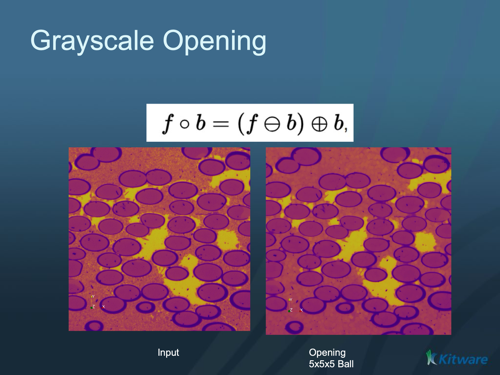
Removes small bright features from a grayscale image (a grayscale erosion followed by a dilation).
Group (Subgroup)
ITKMathematicalMorphology (MathematicalMorphology)
Description
Grayscale opening is an erosion followed by a dilation using the same structuring element. It removes small bright features — small bright spots, thin bright lines, and narrow bright protrusions smaller than the structuring element (the probe shape swept over the image) — while leaving the overall brightness and larger structures essentially unchanged. The dual operation, ITK Grayscale Morphological Closing Image Filter, removes small dark features instead.
Parameter Guidance
Kernel Radius — the radius of the structuring element, in pixels (one value per axis). Bright features smaller than this are removed.
Safe Border — when on (default), a temporary border is added during processing to avoid edge artifacts and removed afterward.
Kernel Type
The Kernel Type parameter selects the structuring element shape:
Annulus [0]: A ring-shaped structuring element.
Ball [1]: A spherical structuring element (default). Most commonly used for general morphological operations.
Box [2]: A rectangular/cuboid structuring element.
Cross [3]: A cross-shaped structuring element.
Required Input Sources
Operates on any scalar (grayscale) image — typically from Read Image, Read Images [3D Stack], or the output of a prior ITK image filter.
Input Parameter(s)
Parameter Name |
Parameter Type |
Parameter Notes |
Description |
|---|---|---|---|
Kernel Radius |
Vector of UInt32 Values |
Order=X,Y,Z |
The radius of the kernel structuring element. |
Kernel Type |
Choices |
Set the kernel or structuring element used for the morphology. |
|
Safe Border |
Bool |
A safe border is added to input image to avoid borders effects and remove it once the closing is done |
Input Cell Data
Parameter Name |
Parameter Type |
Parameter Notes |
Description |
|---|---|---|---|
Image Geometry |
Geometry Selection |
Image |
Select the Image Geometry Group from the DataStructure. |
Input Cell Data |
Array Selection |
Allowed Types: int8, uint8, int16, uint16, int32, uint32, int64, uint64, float32, float64 |
The image data that will be processed by this filter. |
Output Cell Data
Parameter Name |
Parameter Type |
Parameter Notes |
Description |
|---|---|---|---|
Output Cell Data |
DataObjectName |
The result of the processing will be stored in this Data Array inside the same group as the input data. |
Example Pipelines
License & Copyright
Please see the description file distributed with this Plugin
DREAM3D-NX Help
If you need help, need to file a bug report or want to request a new feature, please head over to the DREAM3DNX-Issues GitHub site where the community of DREAM3D-NX users can help answer your questions.