11.8. ITK Binary Dilate Image Filter
Grows (dilates) the foreground objects of a binary or segmented image.
Group (Subgroup)
ITKBinaryMathematicalMorphology (BinaryMathematicalMorphology)
Description
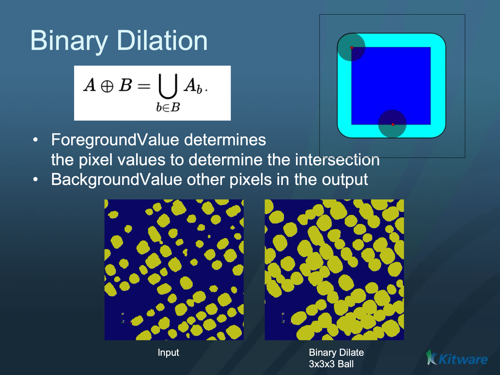
Dilation is a morphological operation that grows the foreground region of an image: a small probe shape called the structuring element is swept over the image, and any background pixel touched by the structuring element when it is centered on a foreground pixel becomes foreground. Dilation fills small gaps, connects nearby objects, and enlarges objects by the radius of the structuring element. (The inverse operation is ITK Binary Erode Image Filter; combining the two gives opening and closing.)
The filter treats one chosen value as foreground. This makes it work directly on segmented images: if segment 1 has value 1, segment 2 has value 2, and so on, set Foreground Value to the segment number you want to dilate.
Parameter Guidance
Foreground Value — the pixel value treated as the object/foreground (everything else is background). Default 1.
Background Value — the value used for background pixels. Default 0.
Boundary To Foreground — controls whether the region just outside the image border is treated as foreground or background, which affects objects that touch the edge of the volume.
Kernel Radius — the radius of the structuring element, in pixels (one value per axis). Objects grow by this amount.
Kernel Type
The Kernel Type parameter selects the structuring element shape:
Annulus [0]: A ring-shaped structuring element.
Ball [1]: A spherical structuring element (default). Most commonly used for general morphological operations.
Box [2]: A rectangular/cuboid structuring element.
Cross [3]: A cross-shaped structuring element.
Required Input Sources
Operates on a binary/segmented image — typically the output of a thresholding filter such as ITK Binary Threshold Image Filter or Multi-Threshold Objects.
Input Parameter(s)
Parameter Name |
Parameter Type |
Parameter Notes |
Description |
|---|---|---|---|
Kernel Radius |
Vector of UInt32 Values |
Order=X,Y,Z |
The radius of the kernel structuring element. |
Kernel Type |
Choices |
Set the kernel or structuring element used for the morphology. |
|
Background Value |
Scalar Value |
Float64 |
Set/Get the background value used to mark the pixels not on the border of the objects. |
Foreground Value |
Scalar Value |
Float64 |
Set/Get the foreground value used to identify the objects in the input and output images. |
BoundaryToForeground |
Bool |
Mark the boundary between foreground and background. |
Input Cell Data
Parameter Name |
Parameter Type |
Parameter Notes |
Description |
|---|---|---|---|
Image Geometry |
Geometry Selection |
Image |
Select the Image Geometry Group from the DataStructure. |
Input Cell Data |
Array Selection |
Allowed Types: int8, uint8, int16, uint16, int32, uint32, int64, uint64 |
The image data that will be processed by this filter. |
Output Cell Data
Parameter Name |
Parameter Type |
Parameter Notes |
Description |
|---|---|---|---|
Output Cell Data |
DataObjectName |
The result of the processing will be stored in this Data Array inside the same group as the input data. |
Example Pipelines
License & Copyright
Please see the description file distributed with this Plugin
DREAM3D-NX Help
If you need help, need to file a bug report or want to request a new feature, please head over to the DREAM3DNX-Issues GitHub site where the community of DREAM3D-NX users can help answer your questions.