9.47. Compute Surface Area to Volume & Sphericity
Group (Subgroup)
Statistics (Morphological)
Description
This Filter calculates the ratio of surface area to volume for each Feature in an Image Geometry.
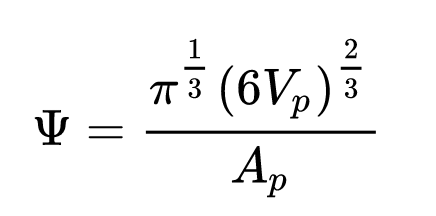
This filter also optionally calculate the Sphericity of each feature.
This Filter determines whether a Feature touches an outer Surface of the sample volume. A Feature is considered touching the Surface of the sample if either of the following conditions are met:
Any cell location is xmin, xmax, ymin, ymax, zmin or zmax
Any cell has Feature ID = 0 as a neighbor.
Algorithm Details
First, all the boundary Cells are found for each Feature.
Next, the surface area for each face that is in contact with a different Feature is totalled as long as that neighboring featureId is > 0.
This number is divided by the volume of each Feature, calculated by taking the number of Cells of each Feature and multiplying by the volume of a Cell.
WARNING - Aliasing
The surface area will be the surface area of the Cells in contact with the neighboring Feature and will be influenced by the aliasing of the structure. As a result, the surface area to volume will likely be over-estimated with respect to the real Feature.
WARNING - Skewed Results for features touching the surface
Because the filter does not include any surface that is touching/connected to a “FeatureId = 0”, those features that are in contact with the edge of the virtual volume or in contact with internal features that are labeled as “FeatureId = 0” will have their values skewed.
Warning - 2D Image Geometry Results
Because even a single slice has volume according to DREAM3D-NX, results will still be computed. These results should NOT be interpreted as “Boundary Length to Area” values.
Input Parameter(s)
Parameter Name |
Parameter Type |
Parameter Notes |
Description |
|---|---|---|---|
Calculate Sphericity |
Bool |
Whether or not to calculate the sphericity of each Feature |
Input Cell Data
Parameter Name |
Parameter Type |
Parameter Notes |
Description |
|---|---|---|---|
Selected Image Geometry |
Geometry Selection |
Image |
The target geometry |
Cell Feature Ids |
Array Selection |
Allowed Types: int32 Comp. Shape: 1 |
Specifies to which feature each cell belongs. |
Input Feature Data
Parameter Name |
Parameter Type |
Parameter Notes |
Description |
|---|---|---|---|
Number of Cells |
Array Selection |
Allowed Types: int32 Comp. Shape: 1 |
Number of Cells that are owned by the Feature. This value does not place any distinction between Cells that may be of a different size |
Output Feature Data
Parameter Name |
Parameter Type |
Parameter Notes |
Description |
|---|---|---|---|
Surface Area to Volume Ratio |
DataObjectName |
Ratio of surface area to volume for each Feature. The units are inverse length |
|
Sphericity Array Name |
DataObjectName |
The sphericity of each feature |
Example Pipelines
(03) Small IN100 Morphological Statistics
License & Copyright
Please see the description file distributed with this Plugin
DREAM3D-NX Help
If you need help, need to file a bug report or want to request a new feature, please head over to the DREAM3DNX-Issues GitHub site where the community of DREAM3D-NX users can help answer your questions.