8.76. Erode/Dilate Coordination Number
Group (Subgroup)
Processing (Cleanup)
Description
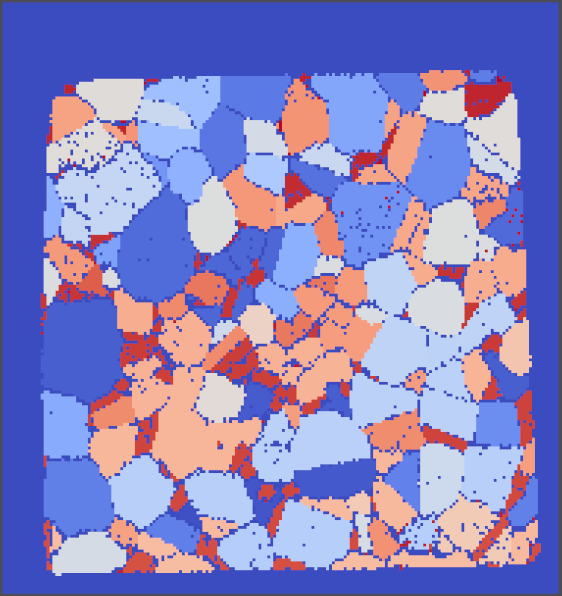
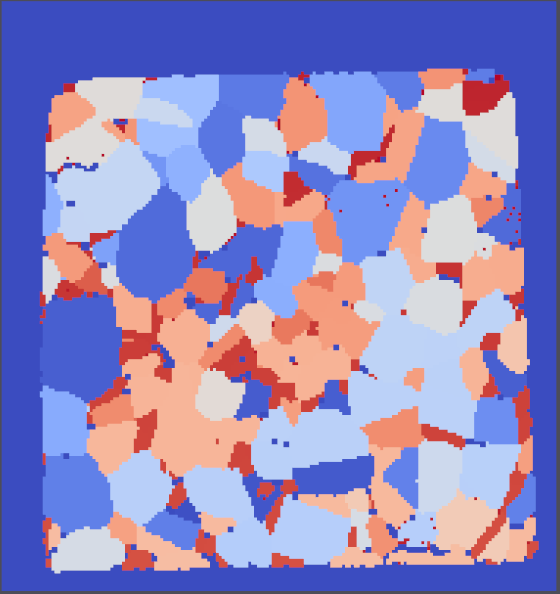
This Filter will smooth the interface between good and bad data. The user can specify a coordination number, which is the number of neighboring Cells of opposite type (i.e., good or bad) compared to a given Cell that is acceptable. For example, a single bad Cell surrounded by good Cells would have a coordination number of 6. The number entered by the user is actually the maximum tolerated coordination number. If the user entered a value of 4, then all good Cells with 5 or more bad neighbors and bad Cells with 5 or more good neighbors would be removed. After Cells with unacceptable coordination number are removed, then the neighboring Cells are coarsened to fill the removed Cells.
By default, the Filter will only perform a single iteration and will not concern itself with the possibility that after one iteration, Cells that were acceptable may become unacceptable by the original coordination number criteria due to the small changes to the structure during the coarsening. The user can opt to enable the Loop Until Gone parameter, which will continue to run until no Cells fail the original criteria.
Before Filter |
After Filter |
|---|---|
|
|
Filter Parameters
Parameter Name |
Parameter Type |
Parameter Notes |
Description |
|---|---|---|---|
Coordination Number to Consider |
Scalar Value |
Int32 |
Number of neighboring Cells that can be of opposite classification before a Cell will be removed |
Loop Until Gone |
Bool |
Keep looping until all criteria is met |
Input Cell Data
Parameter Name |
Parameter Type |
Parameter Notes |
Description |
|---|---|---|---|
Selected Image Geometry |
Geometry Selection |
Image |
The target geometry |
Cell Feature Ids |
Array Selection |
Allowed Types: int32 Comp. Shape: 1 |
Specifies to which feature each cell belongs. |
Attribute Arrays to Ignore |
MultiArraySelection |
The list of arrays to ignore when performing the algorithm |
Example Pipelines
License & Copyright
Please see the description file distributed with this Plugin
DREAM3D-NX Help
If you need help, need to file a bug report or want to request a new feature, please head over to the DREAM3DNX-Issues GitHub site where the community of DREAM3D-NX users can help answer your questions.