9.109. Read HDF5 Dataset
Group (Subgroup)
Core (IO/Read)
Description
This Filter allows the user to import datasets from an HDF5 file and store them as attribute arrays in DREAM3D-NX. This filter supports importing datasets with any number of dimensions, as long as the created attribute array’s total number of components and the tuple count of the destination attribute matrix multiply together to match the HDF5 dataset’s total number of elements.
The component dimensions are input as a comma-delimited list of dimensional values. For example:
3, 4 = 3x4
5, 2, 1 = 5x2x1
6 = 6
Examples
Suppose we have a 1D dataset in an HDF5 file with dimension 12,000. We can input component dimensions of 5, 2, 2 and set the destination attribute matrix tuple dimensions to 35 x 5 x 2 x 2
The total number of elements for the HDF5 dataset is 12,000.
The total number of tuples in the destination attribute matrix is 35*5*2*2 = 700.
The total number of components for the created attribute array is 5*2*2 = 20.
The total number of elements for the created attribute array will be 700*20 = 14,000.
14,000 does not equal 12,000, so this will result in a preflight error.
Suppose we have a 3D dataset in an HDF5 file with dimensions 1 x 16 x 1001 x 1001. We can input component dimensions of 2 and set our destination attribute matrix tuple dimensions to 134 x 67.
The total number of elements for the HDF5 dataset is 1*16*1001*1001 = 16,032,016.
The total number of tuples in the destination attribute matrix is 8*1001*1001 = 8,016,008.
The total number of components for the created attribute array is 2.
The total number of elements for the created attribute array will be 8,016,008*2 = 16,032,016.
The total number of elements of the created attribute array (16,032,016) equals the total number of elements of the HDF5 dataset (16,032,016), so we can import this dataset without errors (see below).
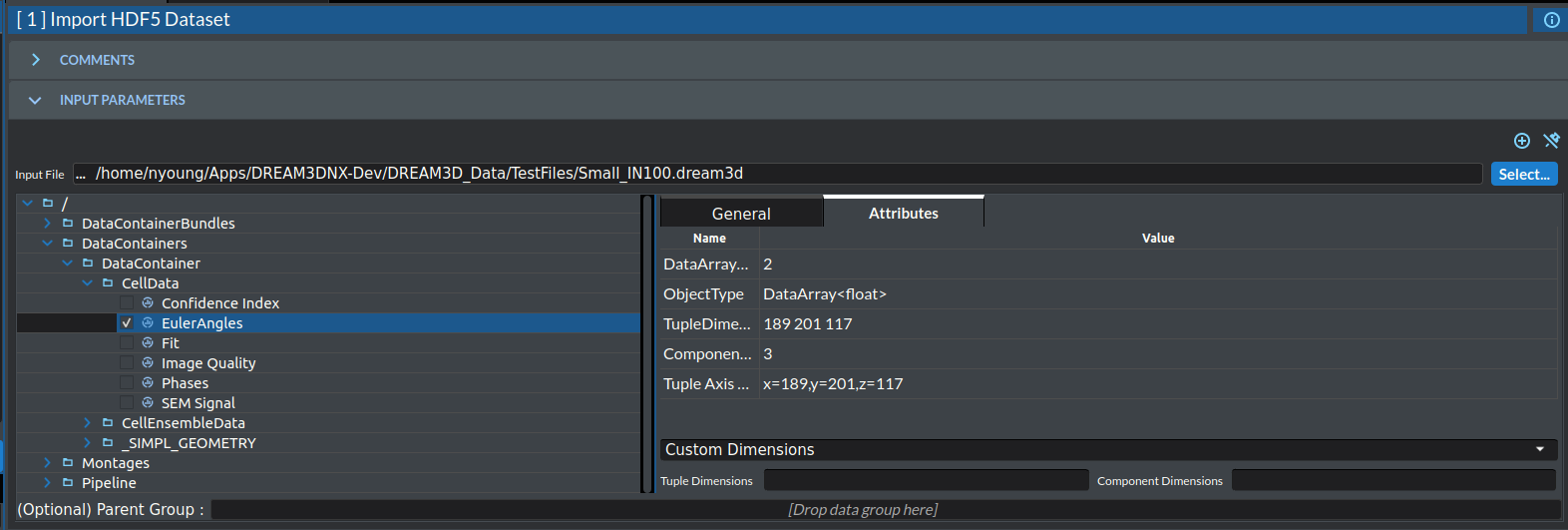
Input Parameter(s)
Parameter Name |
Parameter Type |
Parameter Notes |
Description |
|---|---|---|---|
Select HDF5 File |
ReadHDF5Dataset |
The HDF5 file data to import |
Example Pipelines
License & Copyright
Please see the description file distributed with this Plugin
DREAM3D-NX Help
If you need help, need to file a bug report or want to request a new feature, please head over to the DREAM3DNX-Issues GitHub site where the community of DREAM3D-NX users can help answer your questions.