12.36. Neighbor Orientation Comparison (Bad Data)
Group (Subgroup)
Processing (Cleanup)
Description
This Filter rescues bad cells (those with Mask = false) that are surrounded by good cells with consistent orientations. It does not modify any cell-level attributes other than the Mask array; it only flips the Mask value of qualifying cells from false to true, effectively re-classifying them as good.
This is a sister filter to Neighbor Orientation Correlation. The key difference: this filter only updates the mask, while Neighbor Orientation Correlation copies full cell attributes from a neighbor. Use this filter as the first pass to recover cells that were marked bad by an over-aggressive threshold but are genuinely surrounded by valid neighbors; use Neighbor Orientation Correlation afterward to clean up cells whose orientation is genuinely wrong.
How This Filter Works
For each cell whose Mask is false:
Compute the misorientation between the cell and each of its 6 face-neighbors (cells in the +X, -X, +Y, -Y, +Z, -Z directions).
Count the number of neighbors whose misorientation falls below the user-specified Misorientation Tolerance.
If that count is at least Required Number of Neighbors, flip the cell’s Mask from false to true.
The filter steps down through Required Number of Neighbors from 6 to the user-defined floor: setting it to 4 runs at levels 6, 5, and 4 in sequence.
While the algorithm runs, the Mask array is updated continuously. When a cell’s mask flips, its neighbors are re-evaluated – they may now have enough valid neighbors to qualify themselves. This can cascade into a flood fill, especially if the user sets Required Number of Neighbors very low. Always inspect the output to confirm the filter is not overshooting.
Required Number of Neighbors
The Required Number of Neighbors parameter is the count of agreeing face-neighbors needed to flip the mask and ranges from 1 to 6:
6 – only rescue cells where all 6 face-neighbors agree. Very conservative.
4-5 – rescues most over-thresholded cells while leaving genuinely uncertain cells alone.
2-3 – aggressive; risks cascading.
1 – one matching neighbor is enough; effectively a flood fill.
2D vs 3D
In 2D data (Z dimension = 1), no cell can have 6 face-neighbors because there are no neighbors in the +Z and -Z directions. The maximum count for 2D is therefore 4.
Warning – Data Modification
Only the Mask array is modified. Every other cell-level array (orientations, phases, etc.) is left unchanged. To replace orientation data on cells whose orientations are wrong, run Neighbor Orientation Correlation afterward.
Example Data
Example Input Image |
Example Output Image |
|---|---|
|
|
The Small IN100 data just after initial alignment filters have completed. |
The Small IN100 data after running this filter with Misorientation Tolerance = 5° and Required Number of Neighbors = 4. |
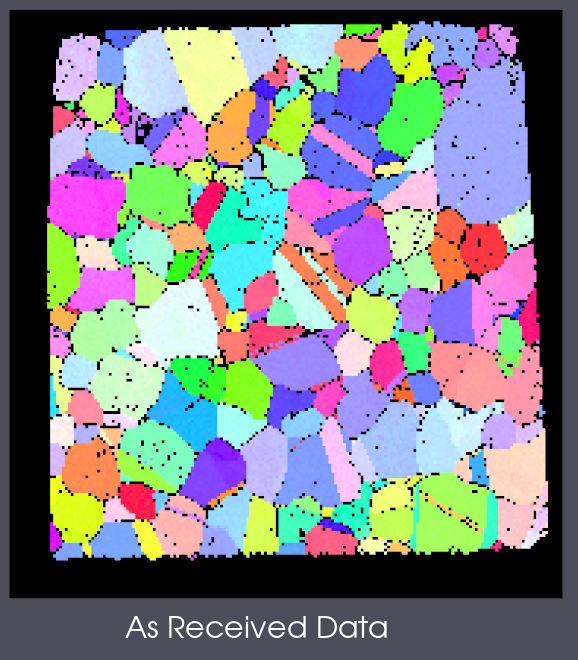
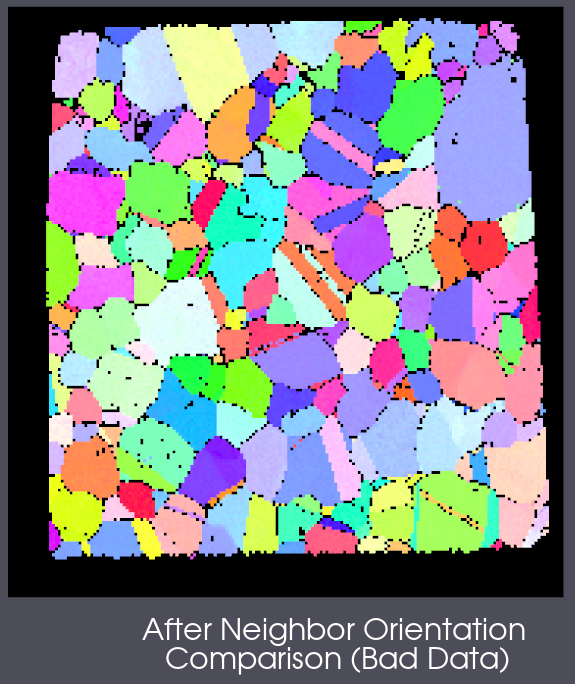
The cells that flipped from false (black) to true (IPF-colored) had Confidence Index just below the original mask threshold (CI > 0.1, IQ > 120) but had enough valid neighbors with consistent orientations to be rescued.
Required Input Sources
Mask Array – a boolean cell-level array, typically produced by Multi-Threshold Objects applied to EBSD confidence/quality scalars.
Cell Quaternions – typically read from EBSD data via Read H5EBSD, Read CTF Data, or Read ANG Data.
Cell Phases – typically read from EBSD data alongside the quaternions.
Crystal Structures – ensemble-level array read from EBSD data or created by Create Ensemble Info.
Input Parameter(s)
Parameter Name |
Parameter Type |
Parameter Notes |
Description |
|---|---|---|---|
Misorientation Tolerance (Degrees) |
Scalar Value |
Float32 |
Angular tolerance used to compare with neighboring Cells |
Required Number of Neighbors |
Scalar Value |
Int32 |
Minimum number of neighbor Cells that must have orientations within above tolerance to allow Cell to be changed |
Input Image Geometry
Parameter Name |
Parameter Type |
Parameter Notes |
Description |
|---|---|---|---|
Image Geometry |
Geometry Selection |
Image |
The target geometry |
Input Cell Data
Parameter Name |
Parameter Type |
Parameter Notes |
Description |
|---|---|---|---|
Cell Quaternions |
Array Selection |
Allowed Types: float32 Comp. Shape: 4 |
Specifies the orientation of the Cell in quaternion representation |
Cell Phases |
Array Selection |
Allowed Types: int32 Comp. Shape: 1 |
Specifies to which Ensemble each Cell belongs |
Input/Output Cell Data
Parameter Name |
Parameter Type |
Parameter Notes |
Description |
|---|---|---|---|
Cell Mask Array |
Array Selection |
Allowed Types: uint8, boolean Comp. Shape: 1 |
Used to define Cells as good or bad |
Input Ensemble Data
Parameter Name |
Parameter Type |
Parameter Notes |
Description |
|---|---|---|---|
Crystal Structures |
Array Selection |
Allowed Types: uint32 Comp. Shape: 1 |
Enumeration representing the crystal structure for each phase |
Example Pipelines
(02) Small IN100 Full Reconstruction
License & Copyright
Please see the description file distributed with this Plugin
DREAM3D-NX Help
If you need help, need to file a bug report or want to request a new feature, please head over to the DREAM3DNX-Issues GitHub site where the community of DREAM3D-NX users can help answer your questions.