12.20. Compute IPF Colors (Face)
Group (Subgroup)
Processing (Crystallography)
Description
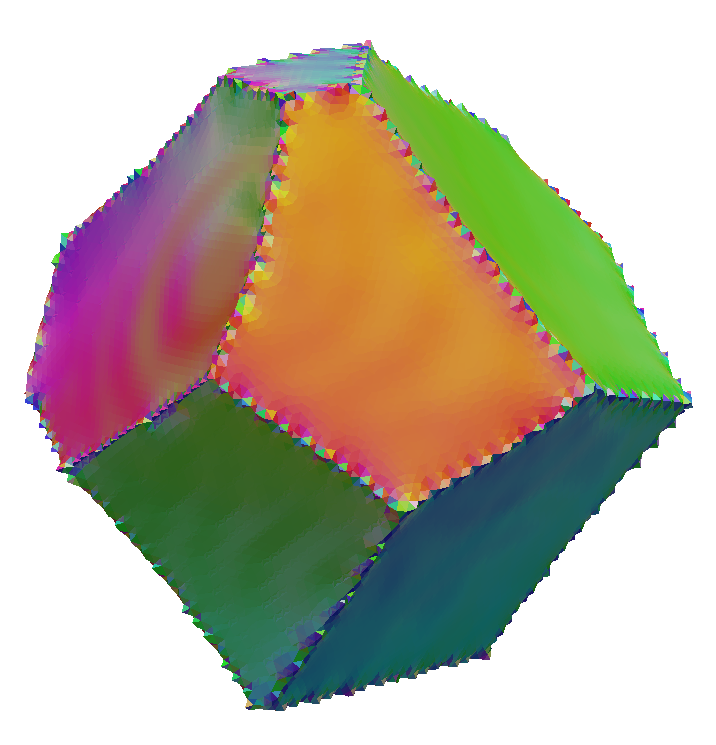
This Filter generates a pair of colors for each Triangle in a Triangle Geometry based on the inverse pole figure (IPF) color scheme for the present crystal structure. Each Triangle has 2 colors since any Face sits at a boundary between 2 Features for a well-connected set of Features that represent grains. The reference direction used for the IPF color generation is the normal of the Triangle.
Each side of a Face is colored using that side’s own feature: the first color uses the first feature’s orientation, its phase’s crystal symmetry (Laue group), and the face normal; the second color uses the second feature’s orientation, its own phase’s crystal symmetry, and the negated (inward) face normal. This matters for multi-phase microstructures where the two features adjacent to a Face belong to phases with different Laue groups (for example a cubic phase against a hexagonal phase) — each side is colored with the correct symmetry for its phase. A side whose feature is invalid (a boundary/exterior face, feature id ≤ 0) is colored black.
Note on migration from DREAM3D 6.5.171: earlier DREAM3D 6.5.171 colored the second side of every Face using the first feature’s crystal symmetry, which produced incorrect colors on mixed-Laue-group faces and left the second color black on faces whose first side was the exterior. DREAM3D-NX (and DREAM3D 6.5.172) compute each side with its own phase’s symmetry. See V&V deviation
ComputeFaceIPFColoringFilter-D1.
Crystallographic Convention (Hexagonal & Trigonal)
The IPF color itself is convention-independent for hexagonal/trigonal phases (the X‖a (TSL/EDAX) and X‖a* (MTEX/Oxford) bases differ only by a 30° rotation about the c-axis, which does not change the RGB). Only the labeling of the inverse-pole-figure triangle corners depends on the convention; the IPF legends shipped with DREAM3D-NX are drawn in the X‖a (TSL/EDAX) convention (apex [0001] = red, the a-axis [2-1-10] = green, the m-axis [10-10] = blue). See the Compute IPF Colors filter documentation for the full corner→color table.
Input Parameter(s)
Parameter Name |
Parameter Type |
Parameter Notes |
Description |
|---|---|---|---|
Color Key |
Choices |
Which IPF color scheme to use: |
|
TSL: Primary-corner SST coloring (EDAX/OIM Analysis default). |
|||
PUCM: Perceptually-uniform color map (Patala / MTEX-style). |
|||
Nolze-Hielscher: MTEX HSV-style coloring. |
Input Triangle Face Data
Parameter Name |
Parameter Type |
Parameter Notes |
Description |
|---|---|---|---|
Face Labels |
Array Selection |
Allowed Types: int32 Comp. Shape: 2 |
Specifies which Features are on either side of each Face |
Face Normals |
Array Selection |
Allowed Types: float64 Comp. Shape: 3 |
Specifies the normal of each Face |
Input Feature Data
Parameter Name |
Parameter Type |
Parameter Notes |
Description |
|---|---|---|---|
Average Euler Angles |
Array Selection |
Allowed Types: float32 Comp. Shape: 3 |
Three angles defining the orientation of the Feature in Bunge convention (Z-X-Z) |
Phases |
Array Selection |
Allowed Types: int32 Comp. Shape: 1 |
Specifies to which phase each Feature belongs |
Input Ensemble Data
Parameter Name |
Parameter Type |
Parameter Notes |
Description |
|---|---|---|---|
Crystal Structures |
Array Selection |
Allowed Types: uint32 Comp. Shape: 1 |
Enumeration representing the crystal structure for each Ensemble |
Output Face Data
Parameter Name |
Parameter Type |
Parameter Notes |
Description |
|---|---|---|---|
First Set of IPF Colors |
DataObjectName |
The first set of RGB color schemes encoded as unsigned chars for each Face |
|
Second Set of IPF Colors |
DataObjectName |
The second set of RGB color schemes encoded as unsigned chars for each Face |
Example Pipelines
(07) Small IN100 Mesh Statistics
License & Copyright
Please see the description file distributed with this Plugin
DREAM3D-NX Help
If you need help, need to file a bug report or want to request a new feature, please head over to the DREAM3DNX-Issues GitHub site where the community of DREAM3D-NX users can help answer your questions.