12.19. Compute IPF Colors
Group (Subgroup)
Processing (Crystallography)
Description
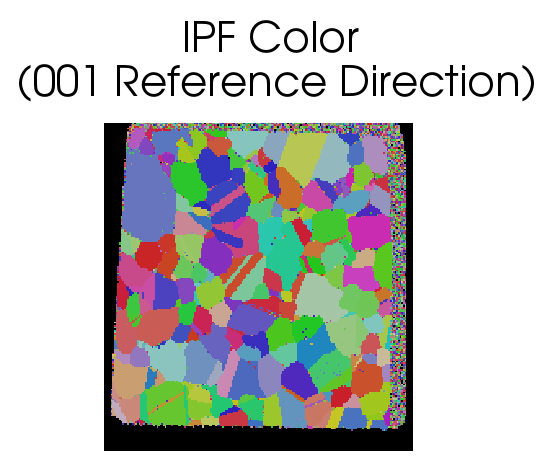
This Filter will generate inverse pole figure (IPF) colors. The user can enter the Reference Direction, which defaults to [001]. The Filter also has the option to apply a black color to all “bad” Elements, as defined by a boolean mask array, which can be generated using the Threshold Objects Filter or any other filter that generates a “mask” of the data and outputs either a bool or uint8 array.
The IPF color for each Element is computed by EbsdLib from the Element’s Euler angles, the reference direction, and the crystal structure (Laue class) of its phase. Elements whose phase has an unknown/unsupported crystal structure, and Elements masked as “bad”, are colored black (0, 0, 0).
Color Key
The Color Key parameter selects which IPF coloring scheme is used:
TSL — legacy primary-corner standard-stereographic-triangle coloring (EDAX/OIM Analysis default). This is the scheme produced by DREAM3D 6.x and is the default.
PUCM — perceptually-uniform color map (Patala / MTEX-style).
Nolze-Hielscher — MTEX HSV-style coloring.
The default (TSL) reproduces the coloring of earlier DREAM3D versions; PUCM and Nolze-Hielscher are new schemes with no DREAM3D 6.x equivalent.
Originating Data Notes
TSL (.ang file)
If the data originates from a TSL .ang file, then Elements that the TSL software could not reliably identify the Euler angles for will have a “Fit of Solution” = 180 and/or an “Image Quality” = 0.0.
This means that when the user runs some sort of threshold Filter the mask will be those Elements that have an Image Quality > 0 and/or Fit < 180.0
HKL (.ctf file)
If the data originates from an HKL (or Bruker) system (.ctf file) then unindexed voxels can typically be found by setting “Error” > 0
This means that when the user runs some sort of threshold Filter the mask will be those Elements that have an Error = 0
IPF Legends
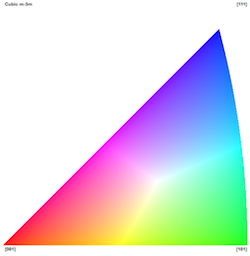
IPF Legends for most all of the Laue classes can be found in the Data/OrientationAnalysis folder that comes with DREAM3D-NX distributions. They are very high resolution images and you are free to use them in any published work.
Crystallographic Convention (Hexagonal & Trigonal)
For hexagonal and trigonal phases the IPF color itself is convention-independent: the X‖a (TSL/EDAX) and X‖a* (MTEX/Oxford) bases differ only by a 30° rotation about the c-axis, which does not change the computed RGB. What depends on the convention is only how the inverse-pole-figure triangle’s corners are labeled. The IPF legends shipped with DREAM3D-NX are drawn in the X‖a (TSL/EDAX) convention, where the Cartesian +X axis is the a-axis [2-1-10]:
Triangle corner |
Crystal direction (X‖a) |
Color |
|---|---|---|
apex |
[0001] (c-axis) |
red |
η = 0° edge |
[2-1-10] (a-axis) |
green |
η = 30° edge |
[10-10] (m-axis) |
blue |
The 6/m, -3m, and -3 Laue classes use wider/shifted triangle wedges (so their green/blue corners are different crystal directions), but the apex is always [0001] = red. Each legend image prints the convention it was generated with as a footnote along its bottom edge.
Input Parameter(s)
Parameter Name |
Parameter Type |
Parameter Notes |
Description |
|---|---|---|---|
Reference Direction |
Vector of Float32 Values |
Order=,, |
The reference axis with respect to compute the IPF colors |
Color Key |
Choices |
Which IPF color scheme to use: |
|
TSL: Legacy primary-corner SST coloring (EDAX/OIM Analysis default). |
|||
PUCM: Perceptually-uniform color map (Patala / MTEX-style). |
|||
Nolze-Hielscher: MTEX HSV-style coloring. |
Optional Data Mask
Parameter Name |
Parameter Type |
Parameter Notes |
Description |
|---|---|---|---|
Use Mask Array |
Bool |
Whether to assign a black color to ‘bad’ Elements |
|
Mask Array |
Array Selection |
Allowed Types: uint8, boolean Comp. Shape: 1 |
Path to the data array used to define Elements as good or bad. |
Input Data
Parameter Name |
Parameter Type |
Parameter Notes |
Description |
|---|---|---|---|
Euler Angles |
Array Selection |
Allowed Types: float32 Comp. Shape: 3 |
Three angles defining the orientation of the Element in Bunge convention (Z-X-Z) |
Phases |
Array Selection |
Allowed Types: int32 Comp. Shape: 1 |
Specifies to which Ensemble each cell belongs |
Input Ensemble Data
Parameter Name |
Parameter Type |
Parameter Notes |
Description |
|---|---|---|---|
Crystal Structures |
Array Selection |
Allowed Types: uint32 Comp. Shape: 1 |
Enumeration representing the crystal structure for each Ensemble |
Output Data
Parameter Name |
Parameter Type |
Parameter Notes |
Description |
|---|---|---|---|
IPF Colors |
DataObjectName |
The name of the array containing the RGB colors encoded as RGB unsigned chars (x3) for each Element |
Example Pipelines
(02) Small IN100 Full Reconstruction
(02) Single Hexagonal Phase Equiaxed
(03) Single Cubic Phase Rolled
INL Export
TxCopper_Exposed
TxCopper_Unexposed
MassifPipeline
InsertTransformationPhase
Edax IPF Colors
(01) Single Cubic Phase Equiaxed
(04) Two Phase Cubic Hexagonal Particles Equiaxed
(06) SmallIN100 Synthetic
License & Copyright
Please see the description file distributed with this Plugin
DREAM3D-NX Help
If you need help, need to file a bug report or want to request a new feature, please head over to the DREAM3DNX-Issues GitHub site where the community of DREAM3D-NX users can help answer your questions.