12.44. Read Oxford Aztec Data (.h5oina)
Group (Subgroup)
IO (Input)
Description
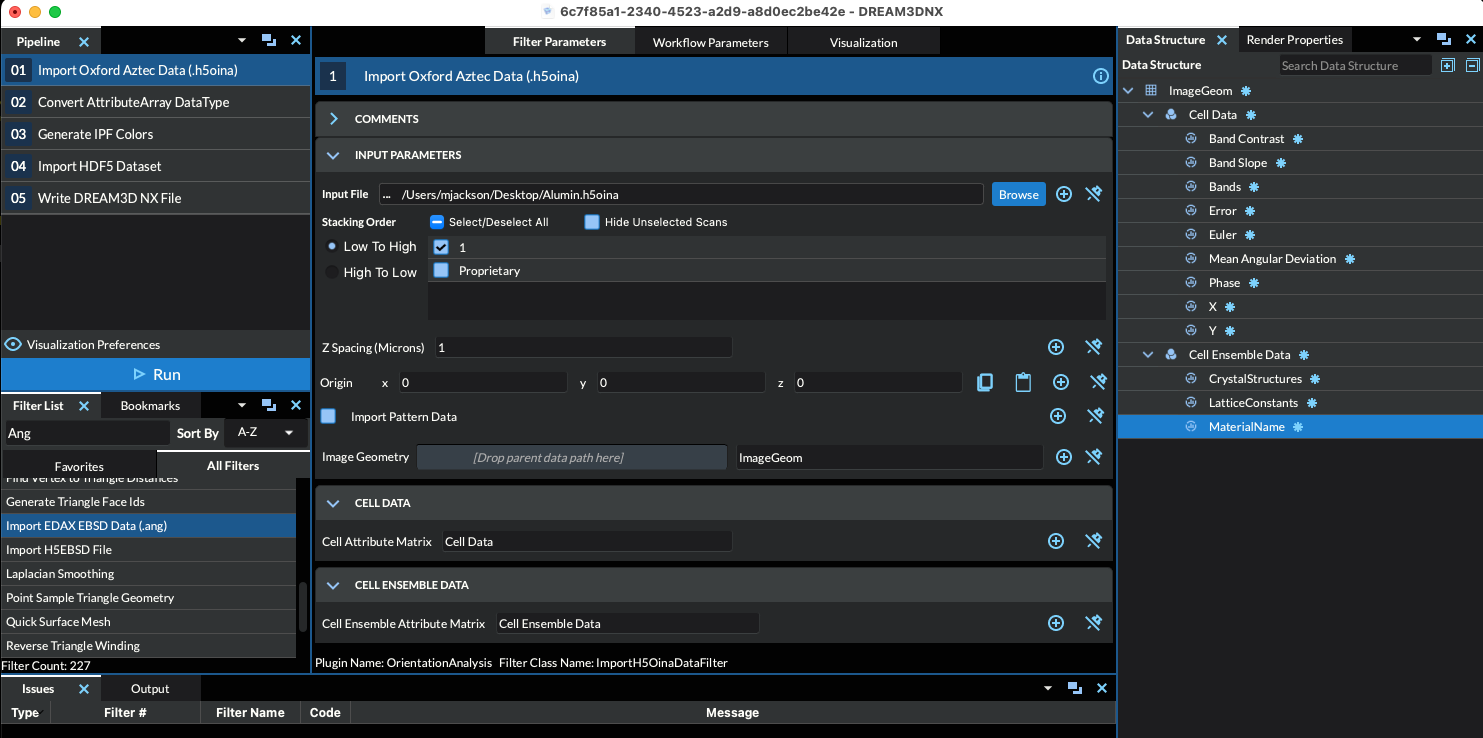
This filter reads data from a single .h5oina file (the HDF5-based export from Oxford Instruments’ AZtec software) into a new Image Geometry. Reading the file directly lets the data be used immediately by other filters, instead of having to first build an intermediate .h5ebsd file. A Cell Attribute Matrix (per-pixel data) and an Ensemble Attribute Matrix (per-phase data) are created to hold the imported EBSD information. The user currently has no control over the names of the created Attribute Arrays.
What This Filter Produces
The file is EBSD (Electron Backscatter Diffraction) scan data. The most important imported arrays are:
Orientation — stored as three Euler angles per pixel (the three angles, in Bunge Z-X-Z convention, that describe how each measured crystal is rotated relative to the sample). Orientation is the basis for almost all downstream crystallographic analysis.
Phase — a per-pixel index identifying which material (phase) was measured at that point.
Pattern-quality metrics — values such as Band Contrast, Band Slope, Bands, and Mean Angular Deviation describe how clear and reliable each measurement is. These are commonly used to flag unreliable pixels (see Reference Frames below).
Per-phase (Ensemble) data — the crystal structure, lattice constants, and material name for each phase. An Ensemble here means one distinct material/crystal type.
Reading More Than One Scan
An H5OINA file can hold several scans. Selecting more than one stacks them into a single 3D Image Geometry: the X and Y extents and step sizes come from the first selected scan, the Z extent is the number of selected scans, and the Z spacing is the Z Spacing parameter. The selected scans become the slices of one 3D microstructure. Therefore, every scan must describe the same grid and use the same phase definitions. The phase-group names, material names, Laue groups, space groups, and lattice constants must match. All scans share one Ensemble Attribute Matrix, so different phase definitions cannot be represented correctly. Import scans with different phase definitions separately.
The Stacking Order setting carried by the scan selection chooses which end of the list lands at Z = 0. Low To High stacks the scans in the order they are listed, so the first selected scan is at Z = 0. High To Low stacks them in the reverse of that order, so the last selected scan is at Z = 0.
Limitations of the Filter
The filter reads a fixed set of header keys and nine data columns, the set Oxford documents
for FORMAT VERSION 2.0. The file’s Format Version value is not used to select what is
read, and a file without that value is read the same way, so a file imports exactly when it
carries that fixed set — the Format Version 5.0 export bundled with this filter’s tests
still does. Any column outside the set — for example Pattern Quality, Beam Position X/Y or the Electron Image tree — is ignored, and can be brought in with the
Read HDF5 Dataset filter.
Importing diffraction patterns is not yet supported for H5OINA files. Turning on
Import Pattern Data stops the filter with an error rather than producing a partial result.
A file’s Processed Patterns or Unprocessed Patterns dataset can be read with the
Read HDF5 Dataset filter.
Notes About Reference Frames
In order to bring the crystal reference frame and the sample reference frame into coincidence, rotations MAY need to be applied to the data. Two filters can perform the necessary rotations:
Historical reference frame operations for Oxford data are the following:
Sample Reference Frame: 180o about the <010> Axis
Crystal Reference Frame: None
The user also may want to assign un-indexed pixels to be ignored by flagging them as “bad”. The Multi-Threshold Objects filter can be used to define this mask. For H5OINA data, threshold on Phase > 0: an un-indexed point carries phase 0, which is the reserved invalid-phase slot.
Do not assume Error = 0 marks a good point in an H5OINA file. AZtec writes an enumerated status code there whose values are not the same as the .ctf convention: in the AZtec export bundled with this filter’s tests, every one of the 587 indexed points carries Error = 1 and every one of the 38 un-indexed points carries Error = 2, and no point carries 0. A mask built from Error = 0 would select nothing on that file.
Radians and Degrees
All orientation data in the H5OINA file are in radians, and the imported Euler array is in
radians as well — no conversion is applied.
The per-phase LatticeConstants array is the one place where a unit does change on import.
An H5OINA file stores its three lattice angles in radians; they are imported as degrees,
so that the array means the same thing no matter which EBSD format the phase came from. A
cubic phase therefore reports 90, 90, 90 rather than 1.5707964, 1.5707964, 1.5707964.
The three lattice dimensions are imported unchanged.
This is a breaking change to a published output, and it is not in any released
version. DREAM3D-NX 7.0.0 through 7.4.1 reported those three slots in radians for
H5OINA imports. See the migration notes below before comparing an H5OINA import against
a .dream3d file, a regression baseline, or a pipeline result produced by one of those
releases.
The Axis Alignment Issue for Hexagonal Symmetry [1]
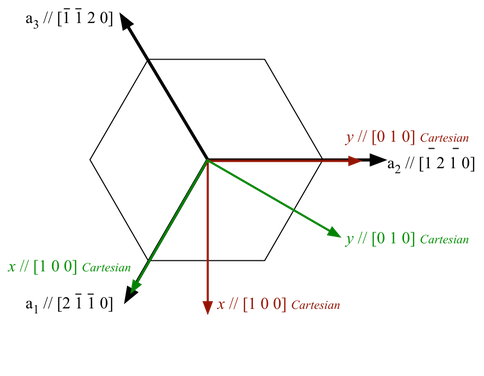
The issue with hexagonal materials is the alignment of the Cartesian coordinate system used for calculations with the crystal coordinate system (the Bravais lattice).
In one convention (e.g. EDAX.TSL), the x-axis, i.e. [1,0,0], is aligned with the crystal a1 axis, i.e. the [2,-1,-1,0] direction. In this case, the y-axis is aligned with the [0,1,-1,0] direction. (Green Axis in Figure 1)
In the other convention, (e.g. Oxford Instr, Univ. Metz software), the x-axis, i.e. [1,0,0], is aligned with the crystal [1,0,-1,0] direction. In this case, the y-axis is aligned with the [-1,2,-1,0] direction. (Red Axis in Figure 1)
This is important because texture analysis can lead to an ambiguity as to the alignment of [2,-1,-1,0] versus [1,0,-1,0], with apparent 30 Degree shifts in the data.
Caution: it appears that the axis alignment is a choice that must be made when installing TSL software so determination of which convention is in use must be made on a case-by-case basis. It is fixed to the y-convention in the HKL software.
The main clue that something is wrong in a conversion is that either the 2110 & 1010 pole figures are transposed, or that a peak in the inverse pole figure that should be present at 2110 has shifted over to 1010.
DREAM3D-NX uses the TSL/EDAX convention.
The result of this is that the filter will by default add 30 degrees to the third Euler angle (phi2) of every point whose phase is Hexagonal-High when reading Oxford
.h5oinafiles. Because the file’s Euler angles are in radians, the value actually added is 30 degrees expressed in radians (pi/6, about 0.5235988). Points of any other symmetry, and un-indexed points, are never adjusted. This can be disabled by the user if necessary.
Figure 1 |
|---|
|
Figure 1: showing TSL and Oxford Instr. conventions. EDAX/TSL is in Green. Oxford Inst. is in Red |
Downstream Processing
Once the reference frames are correct, the imported Euler angles are typically converted to other orientation representations (quaternions, etc.) with Convert Orientation Representation before computing misorientations, segmenting grains, or generating pole figures.
Required Input Sources
None — this filter reads directly from a .h5oina file on disk.
Created Outputs
The array names are the H5OINA dataset names, so several contain spaces.
Cell Attribute Matrix
Name |
Type |
Components |
Notes |
|---|---|---|---|
|
uint8 |
1 |
|
|
uint8 |
1 |
|
|
uint8 |
1 |
|
|
uint8 |
1 |
AZtec status code; see the note on masking below — do not assume 0 means “indexed” |
|
float32 |
3 |
Radians; phi2 optionally shifted for Hexagonal-High points |
|
float32 |
1 |
|
|
int32 or uint8 |
1 |
int32 by default; uint8 when Convert Phase Data to Int32 is off. 0 marks an un-indexed point |
|
float32 |
1 |
|
|
float32 |
1 |
Ensemble Attribute Matrix
One tuple per phase in the file, plus tuple 0, which is reserved for the invalid phase that un-indexed points refer to.
Name |
Type |
Components |
Notes |
|---|---|---|---|
|
uint32 |
1 |
Mapped from the file’s Laue group; 999 in tuple 0 |
|
float32 |
6 |
a, b, c then alpha, beta, gamma in degrees; all zero in tuple 0 |
|
string |
1 |
|
Input Parameter(s)
Parameter Name |
Parameter Type |
Parameter Notes |
Description |
|---|---|---|---|
Scan Names |
orientationanalysis.OEMEbsdScanSelection |
The name of the scan in the .h5oina file. Oxford can store multiple scans in a single file |
|
Convert Hexagonal X-Axis to EDAX Standard |
Bool |
Whether or not to convert a Hexagonal phase to the EDAX standard for x-axis alignment |
|
Convert Phase Data to Int32 |
Bool |
Native Phases data value is uint8. Convert to Int32 for better filter compatibility |
|
Origin |
Vector of Float32 Values |
Order=x,y,z |
The origin of the volume |
Z Spacing (Microns) |
Scalar Value |
Float32 |
The spacing in microns between each layer. |
Import Pattern Data |
Bool |
Whether or not to import the diffraction pattern data. Pattern import is not yet supported for H5OINA files, so turning this on stops the filter with an error. |
Output Image Geometry
Parameter Name |
Parameter Type |
Parameter Notes |
Description |
|---|---|---|---|
Image Geometry |
DataGroupCreation |
The path to the created Image Geometry |
Output Cell Attribute Matrix
Parameter Name |
Parameter Type |
Parameter Notes |
Description |
|---|---|---|---|
Cell Attribute Matrix |
DataObjectName |
The name of the cell data attribute matrix for the created Image Geometry |
Output Ensemble Attribute Matrix
Parameter Name |
Parameter Type |
Parameter Notes |
Description |
|---|---|---|---|
Ensemble Attribute Matrix |
DataObjectName |
The Attribute Matrix where the phase information is stored. |
Migration Notes
Documented behavioral differences from DREAM3D-NX 7.0.0 through 7.4.1 are maintained as
Deviation entries in the source tree at
src/Plugins/OrientationAnalysis/vv/deviations/ReadH5OinaDataFilter.md. Two of them
change values that an existing pipeline may compare against.
LatticeConstantsangle slots are degrees, not radians (ReadH5OinaDataFilter-D6). Every.dream3dfile written by 7.0.0 through 7.4.1 carries radians in components 3, 4 and 5 of that array, so any saved exemplar, regression baseline or pipeline comparison that reads them changes value. Multiply a stored radian value by 180/pi to compare it against a new import, and remove any downstream conversion that was compensating for the radian values. Nothing else in the import changes unit: theEulerarray is still radians and the three lattice dimensions are still unconverted.The hexagonal x-axis alignment adds 30 degrees, not 30 radians (
ReadH5OinaDataFilter-D1). Orientations imported from a file with a hexagonal phase by 7.0.0 through 7.4.1 with Convert Hexagonal X-Axis to EDAX Standard left on — its default — are wrong and cannot be corrected after the fact; re-import the file.
Example Pipelines
References
[1] Wright, S. I. and De Graef, M., “Electron backscatter diffraction,” International Tables for Crystallography. EBSD reference-frame conventions.
DREAM3D-NX Help
If you need help, need to file a bug report or want to request a new feature, please head over to the DREAM3DNX-Issues GitHub site where the community of DREAM3D-NX users can help answer your questions.