12.16. Compute GBCD (Metric-Based Approach)
Group (Subgroup)
Statistics (Crystallography)
Description
This Filter computes a section through the five-dimensional grain boundary character distribution (GBCD) for a fixed misorientation, using a metric-based approach rather than binning. An example of such a section is shown in Fig. 1.
Unlike the Compute GBCD filter, which partitions the boundary space into discrete bins, this filter uses a continuous metric-based approach described by K. Glowinski and A. Morawiec in Analysis of experimental grain boundary distributions based on boundary-space metrics, Metall. Mater. Trans. A 45, 3189-3194 (2014). The metric-based approach avoids discretization artifacts and can produce smoother distributions, especially with limited data.
![Fig. 1: Section for the 17.9 deg./[111] misorientation through the grain boundary distribution obtained using this Filter for the small IN100 data set. Units are multiples of random distribution (MRDs).](../_images/ComputeGBCDMetricBased_dist.png)
The metric-based approach defines distance measures in the boundary space so that boundaries with similar geometry are considered “close” and boundaries with different geometry are considered “distant,” taking crystal symmetry into account. The procedure has two stages:
Misorientation selection: Boundary segments whose misorientation is within a limiting angular distance ρm of the user-specified fixed misorientation are selected.
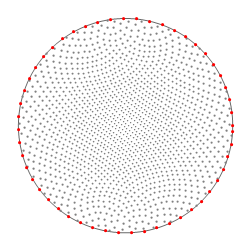
Normal probing: The distribution is sampled at evenly distributed normal directions (see Fig. 2). For each sampling direction, the areas of boundaries whose normals fall within ρp of that direction are summed.
The limiting distances ρm and ρp should be chosen based on the resolution, amount, and quality of the data. The result is normalized and expressed in multiples of a random distribution (MRD).
Image |
|---|
|
Fig. 2: End-points (drawn in stereographic projection) of sampling directions used for probing distribution values; the number of points here is about 1500. Additionally, distributions are probed at points lying at the equator (marked with red); this is helpful for some plotting software. |
This Filter also calculates statistical errors of the distributions using the formula
ε = ( f n v )1/2
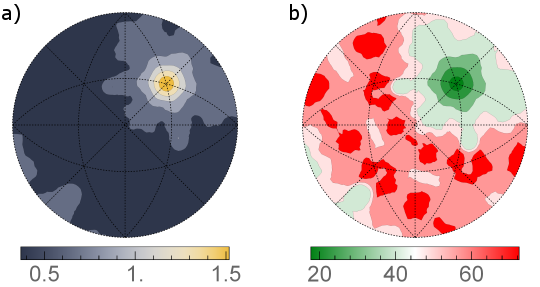
where ε is the relative error of the distribution function at a given point, f is the value of the function at that point, n stands for the number of grain boundaries (not the number of mesh triangles) in the considered network, and v denotes the volume restricted by ρm and ρp. The errors can be calculated either as their absolute values, i.e., ε × f (Fig. 3a) or as relative errors, i.e., 100% × ε (Fig. 3b). The latter are computed in a way that if the relative error exceeds 100%, it is rounded down to 100%.
Image |
|---|
|
|
Format of Output Files
Output files are formatted to be readable by GMT plotting program. The first line contains the fixed misorientation axis and angle. Each of the remaining lines contains three numbers. The first two columns are angles (in degrees) describing a given sampling direction; let us denote them col1 and col2, respectively. The third column is either the value of the GBCD (in MRD) for that direction or its error (in MRD or %, depending on user’s selection). If you use other software, you can retrive spherical angles θ and φ of the sampling directions in the following way:
θ = 90° - col1
φ = col2
Then, the directions are given as [ sin θ × cos φ , sin θ × sin φ , cos θ ].
Feedback
In the case of any questions, suggestions, bugs, etc., please feel free to email the author of this Filter at kglowinski at ymail.com
Limiting Distances
The Limiting Distances parameter selects the maximum angular deviations used when selecting boundary segments. The choices are pairs of (misorientation radius, plane-inclination radius):
3 deg. Misorientations; 7 deg. Plane Inclinations [0]: Use a 3-degree misorientation radius and a 7-degree plane-inclination radius.
5 deg. Misorientations; 5 deg. Plane Inclinations [1]: Use a 5-degree radius for both misorientations and plane inclinations.
5 deg. Misorientations; 7 deg. Plane Inclinations [2]: Use a 5-degree misorientation radius and a 7-degree plane-inclination radius.
5 deg. Misorientations; 8 deg. Plane Inclinations [3]: Use a 5-degree misorientation radius and an 8-degree plane-inclination radius.
6 deg. Misorientations; 7 deg. Plane Inclinations [4]: Use a 6-degree misorientation radius and a 7-degree plane-inclination radius.
7 deg. Misorientations; 7 deg. Plane Inclinations [5]: Use a 7-degree radius for both misorientations and plane inclinations.
8 deg. Misorientations; 8 deg. Plane Inclinations [6]: Use an 8-degree radius for both misorientations and plane inclinations.
Required Input Sources
This filter operates on a grain-boundary surface mesh and requires the following upstream steps:
Triangle Geometry with Face Labels, Face Normals, Face Areas, and Node Types – produced by a surface meshing filter such as Quick Surface Mesh, followed by Compute Triangle Normals and Compute Triangle Areas.
Feature Euler Angles / Feature Phases – feature-level averages produced by Compute Average Orientations and Compute Feature Phases.
Crystal Structures – ensemble-level array read from EBSD data or created by Create Ensemble Info.
Input Parameter(s)
Parameter Name |
Parameter Type |
Parameter Notes |
Description |
|---|---|---|---|
Phase of Interest |
Scalar Value |
Int32 |
Index of the Ensemble for which to compute GBCD; boundaries having grains of this phase on both its sides will only be taken into account |
Fixed Misorientation |
Vector of Float32 Values |
Order=x,y,z,w |
Axis-angle representation of the misorientation of interest. Angle value should be in degrees. |
Limiting Distances |
Choices |
The max angles from within which boundary segments are selected for the misorientations and plane inclinations |
|
Number of Sampling Points (on a Hemisphere) |
Scalar Value |
Int32 |
The approximate number of sampling directions |
Exclude Triangles Directly Neighboring Triple Lines |
Bool |
If checked, only interiors of Faces are included in GBCD |
|
Save Relative Errors Instead of Their Absolute Values |
Bool |
Whether or not to save the distribution errors as relative (if exceeds 100%, then rounded down) or absolute |
|
Triangle Geometry |
Geometry Selection |
Triangle |
The complete path to the triangle geometry |
Input Triangle Geometry Vertex Data
Parameter Name |
Parameter Type |
Parameter Notes |
Description |
|---|---|---|---|
Node Types |
Array Selection |
Allowed Types: int8 Comp. Shape: 1 |
Specifies the type of node in the Geometry |
Input Triangle Geometry Face Data
Parameter Name |
Parameter Type |
Parameter Notes |
Description |
|---|---|---|---|
Face Labels |
Array Selection |
Allowed Types: int32 Comp. Shape: 2 |
Specifies which Features are on either side of each Face |
Face Normals |
Array Selection |
Allowed Types: float64 Comp. Shape: 3 |
Specifies the normal of each Face |
Face Areas |
Array Selection |
Allowed Types: float64 Comp. Shape: 1 |
Specifies the area of each Face |
Input Triangle Geometry Face Feature Data
Parameter Name |
Parameter Type |
Parameter Notes |
Description |
|---|---|---|---|
Feature Face Labels |
Array Selection |
Allowed Types: int32 Comp. Shape: 2 |
Specifies which original Features are on either side of each boundary Feature |
Input Feature Data
Parameter Name |
Parameter Type |
Parameter Notes |
Description |
|---|---|---|---|
Average Euler Angles |
Array Selection |
Allowed Types: float32 Comp. Shape: 3 |
Three angles defining the orientation of the Feature in Bunge convention (Z-X-Z) |
Phases |
Array Selection |
Allowed Types: int32 Comp. Shape: 1 |
Specifies to which phase each Feature belongs |
Input Ensemble Data
Parameter Name |
Parameter Type |
Parameter Notes |
Description |
|---|---|---|---|
Crystal Structures |
Array Selection |
Allowed Types: uint32 Comp. Shape: 1 |
Enumeration representing the crystal structure for each Ensemble |
Output Parameters
Parameter Name |
Parameter Type |
Parameter Notes |
Description |
|---|---|---|---|
Output Distribution File |
FileSystemPath |
The output distribution file path (extension .dat, GMT format) |
|
Output Distribution Errors File |
FileSystemPath |
The output distribution errors file path (extension .dat, GMT format) |
References
[1] K. Glowinski and A. Morawiec, Analysis of experimental grain boundary distributions based on boundary-space metrics, Metall. Mater. Trans. A 45, 3189-3194 (2014)
Example Pipelines
(05) SmallIN100 GBCD Metric.d3dpipeline
This pipeline depends on previous pipelines in the Small IN100 reconstruction pipeline series.
License & Copyright
Please see the description file distributed with this Plugin.
DREAM3D-NX Help
If you need help, need to file a bug report or want to request a new feature, please head over to the DREAM3DNX-Issues GitHub site where the community of DREAM3D-NX users can help answer your questions.