12.37. Neighbor Orientation Correlation
Group (Subgroup)
Processing (Cleanup)
Description
This filter first identifies all cells that have a Confidence Index below the minimum set by the user. Then, for each of those cells, every pair of its face-neighbor cells is compared: a pair whose two cells belong to the same (non-zero) phase and whose orientations differ by less than the user defined Misorientation Tolerance is counted as similar, and each similar pair credits both of its cells. The neighbor with the highest similar-pair count is the “best” neighbor, and all of the bad cell’s attributes are replaced with that neighbor’s attributes (ties resolve to the last neighbor in the fixed −Z, −Y, −X, +X, +Y, +Z scan order, which matches the neighbor DREAM.3D 6.5.171 picked whenever all counts tie). A low-confidence cell whose neighbors contain no similar pair is left unchanged.
The whole scan-and-replace process runs 6 − Cleanup Level times (a Cleanup Level of 4 runs 2 passes). Because the replaced cell also inherits its neighbor’s Confidence Index, each pass can enable further replacements in the next pass, growing repairs inward from the edges of bad regions.
Note: Despite its name, Cleanup Level is not a neighbor-count threshold — it only controls the number of passes. Lower values clean more aggressively. At the default value of 6 the filter performs zero passes and makes no changes; set the level below 6 for the filter to do anything.
Neighbors are defined as the “nearest neighbors” which share a “face”. For 3D structures it is 6 neighbors that share a common face with the current cell; for 2D data the 4 in-plane neighbors are used.
Schematic Example
0 |
1 |
2 |
|
|---|---|---|---|
0 |
(14.0, 0.0, 0.0) CI=0.2 |
||
1 |
(13.0, 0.0, 0.0) CI=0.2 |
(0.0, 0.0, 0.0) CI=0.05 |
(12.0, 0.0, 0.0) CI=0.2 |
2 |
(15.0, 0.0, 0.0) CI=0.2 |
Cell (1,1) has CI = 0.05, which is below a 0.1 minimum, so it is flagged. Its 4 in-plane neighbors all have orientations within 5 degrees of each other (Euler angles around (12-15, 0, 0)) but more than 5 degrees from (1,1)’s orientation (0, 0, 0). At Cleanup Level = 4, the four neighbors agree, so (1,1)’s attributes are replaced with one of them.
In this example, cell (1,1) has a confidence index < 0.1. Its four neighbors are compared pairwise with each other: (13.0), (14.0), (12.0) and (15.0) are all within a few degrees of each other, so every neighbor participates in several similar pairs. The central cell (1,1) has all of its attributes replaced with those of the neighbor holding the highest similar-pair count. Note that the central cell’s own orientation and phase play no role in choosing the replacement — only the mutual similarity of its neighbors matters.
Example Data
Example Input/Output Images |
|---|
|
The Small IN100 data just after some initial cleanup filters have been used. |
|
The Small IN100 data after running this filter with Misorientation Tolerance = 5°, Cleanup Level = 2, and Minimum Confidence Index = 0.2. |
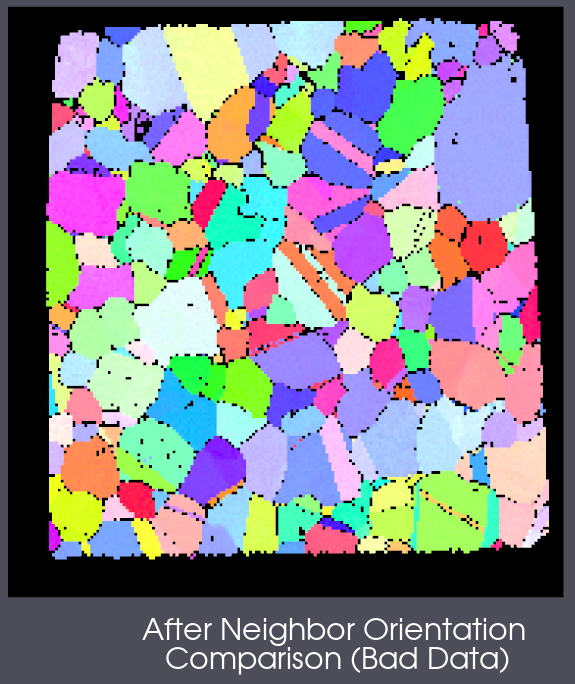
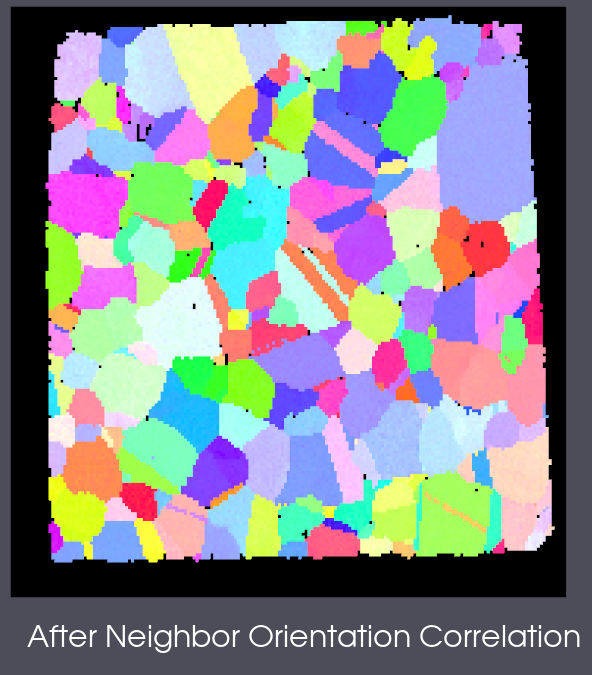
These before-and-after images show how this filter can fill in non-indexed EBSD cells. Use it for small isolated bad regions, not for flood-filling entire low-confidence areas.
Warning - Cell-Level Data Modification
This filter will copy all attribute data from neighboring cells into the target cell if the criteria is met. Arrays listed in Attribute Arrays to Ignore are excluded from the copy.
Differences from legacy DREAM.3D 6.5.171
DREAM3D-NX’s implementation fixes three defects present in DREAM.3D 6.5.171, so results will differ on most datasets:
6.5.171 could count a mixed-phase (or unindexed, phase-0) neighbor pair as “similar” by reusing the previous pair’s misorientation, occasionally replacing a cell with data from a different phase.
6.5.171 ran only half the cleanup passes of the original design (
ceil((6 − Level)/2)instead of6 − Level), leaving deep bad regions partially unfilled.6.5.171 copied from the last neighbor having any similar pair rather than the neighbor with the highest similarity count. (When all counts tie — the common case in grain interiors — both versions pick the same neighbor.)
See NeighborOrientationCorrelationFilter-D1 through -D4 in src/Plugins/OrientationAnalysis/vv/deviations/NeighborOrientationCorrelationFilter.md for the full analysis and migration guidance.
Input Parameter(s)
Parameter Name |
Parameter Type |
Parameter Notes |
Description |
|---|---|---|---|
Minimum Confidence Index |
Scalar Value |
Float32 |
Sets the minimum value of ‘confidence’ a Cell must have |
Misorientation Tolerance (Degrees) |
Scalar Value |
Float32 |
Angular tolerance used to compare with neighboring Cells |
Cleanup Level |
Scalar Value |
Int32 |
Controls the number of cleanup passes: the filter runs (6 - Level) passes, so lower values clean more aggressively. At the default of 6 the filter performs zero passes and makes no changes |
Input Cell Data
Parameter Name |
Parameter Type |
Parameter Notes |
Description |
|---|---|---|---|
Image Geometry |
Geometry Selection |
Image |
Path to the target geometry |
Confidence Index |
Array Selection |
Allowed Types: float32 Comp. Shape: 1 |
Specifies the confidence in the orientation of the Cell (TSL data) |
Cell Phases |
Array Selection |
Allowed Types: int32 Comp. Shape: 1 |
Specifies to which Ensemble each Cell belongs |
Cell Quaternions |
Array Selection |
Allowed Types: float32 Comp. Shape: 4 |
Specifies the orientation of the Cell in quaternion representation |
Input Ensemble Data
Parameter Name |
Parameter Type |
Parameter Notes |
Description |
|---|---|---|---|
Crystal Structures |
Array Selection |
Allowed Types: uint32 Comp. Shape: 1 |
Enumeration representing the crystal structure for each Ensemble |
Attribute Arrays to Ignore |
MultiArraySelection |
The list of arrays to ignore |
Example Pipelines
(02) SmallIN100 Full Reconstruction
INL Export
License & Copyright
Please see the description file distributed with this Plugin
DREAM3D-NX Help
If you need help, need to file a bug report or want to request a new feature, please head over to the DREAM3DNX-Issues GitHub site where the community of DREAM3D-NX users can help answer your questions.