12.6. Compute Feature Boundary Strength Metrics
Group (Subgroup)
Statistics (Crystallography)
Description
This Filter computes slip transmission metrics for each Face (triangle) on a grain boundary mesh. These metrics quantify how easily plastic deformation can transfer across a grain boundary, based on the geometric alignment of slip systems in the two grains on either side.
This filter computes the same metrics as the Compute Neighbor Slip Transmission Metrics filter, but stores results per boundary Face rather than per Feature. This makes it suitable for visualization and analysis on a Triangle Geometry surface mesh.
For a detailed explanation of the slip transmission concept and the individual metrics, see the Compute Neighbor Slip Transmission Metrics documentation.
Cubic Materials Only
This filter only works on cubic m-3m Laue classes.
How This Filter Works
For each Face in the Triangle Geometry, the filter identifies the two Features on either side
The average orientation of both Features is retrieved
Transmission metrics are calculated in both directions (Feature 1 → Feature 2 and Feature 2 → Feature 1), since the direction of slip approaching the boundary affects the result
Both directional values are stored on the Face
Luster-Morris Parameter (M’)
The Luster-Morris parameter measures geometric compatibility between slip systems across a boundary. Calculated as presented in [1].
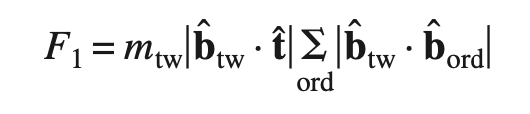
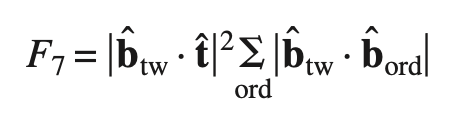
Fracture Initiation Parameters (F1, F1spt, F7)
Three fracture initiation parameter values are computed per Face, as defined in [2] (see page 021012-4):

References
Required Input Sources
This filter operates on a grain-boundary surface mesh and requires the following upstream steps:
Triangle Geometry and Face Labels – produced by a surface meshing filter such as Quick Surface Mesh.
Average Quaternions – the per-feature average orientation produced by Compute Average Orientations.
Feature Phases – produced by Compute Feature Phases.
Crystal Structures – ensemble-level array read from EBSD data or created by Create Ensemble Info.
Input Parameter(s)
Parameter Name |
Parameter Type |
Parameter Notes |
Description |
|---|---|---|---|
Loading Direction (XYZ) |
Vector of Float64 Values |
Order=x,y,z |
The loading axis for the sample |
Input Triangle Face Data
Parameter Name |
Parameter Type |
Parameter Notes |
Description |
|---|---|---|---|
Face Labels |
Array Selection |
Allowed Types: int32 Comp. Shape: 2 |
Data Array that specifies which Features are on either side of each Face |
Input Feature Data
Parameter Name |
Parameter Type |
Parameter Notes |
Description |
|---|---|---|---|
Average Quaternions |
Array Selection |
Allowed Types: float32 Comp. Shape: 4 |
Data Array that specifies the average orientation of each Feature in quaternion representation |
Phases |
Array Selection |
Allowed Types: int32 Comp. Shape: 1 |
Data Array that specifies to which Ensemble each Feature belongs |
Input Ensemble Data
Parameter Name |
Parameter Type |
Parameter Notes |
Description |
|---|---|---|---|
Crystal Structures |
Array Selection |
Allowed Types: uint32 Comp. Shape: 1 |
Enumeration representing the crystal structure for each phase |
Output Face Data
Parameter Name |
Parameter Type |
Parameter Notes |
Description |
|---|---|---|---|
F1s |
DataObjectName |
DataArray Name to store the calculated F1s Values |
|
F1spts |
DataObjectName |
DataArray Name to store the calculated F1spts Values |
|
F7s |
DataObjectName |
DataArray Name to store the calculated F7s Values |
|
mPrimes |
DataObjectName |
DataArray Name to store the calculated mPrimes Values |
Example Pipelines
License & Copyright
Please see the description file distributed with this Plugin
DREAM3D-NX Help
If you need help, need to file a bug report or want to request a new feature, please head over to the DREAM3DNX-Issues GitHub site where the community of DREAM3D-NX users can help answer your questions.